

How to Invite Contributors to Record
Last updated July 21, 2026
Overview
Inviting contributors effectively is one of the most important factors in a successful Video Story.
While Spokn offers an automated email invite option, personalized outreach from you is almost always most effective in getting higher participation rates and better quality responses.
This guide explains the most effective way to invite contributors to record.
The Recommended Approach: Send a Personal Message
The most successful campaigns use:
- A personalized message
- A direct recording link
- A clear deadline
- A short explanation of purpose, where and how the content will be used
Instead of relying on Spokn's automated email invites, which may be blocked by filters, we recommend coping your recording link and send it directly through:
- Slack
- Microsoft Teams
- Text (when appropriate)
- Internal newsletters or intranet posts
- Embed it in a QR code for in-person or frontline recording
Step 1: Copy the Recording Link
1. Open your Video Story. 2. Click Invite Contributors. 3. Click Get Invite Link. 4. Paste the link into your message.
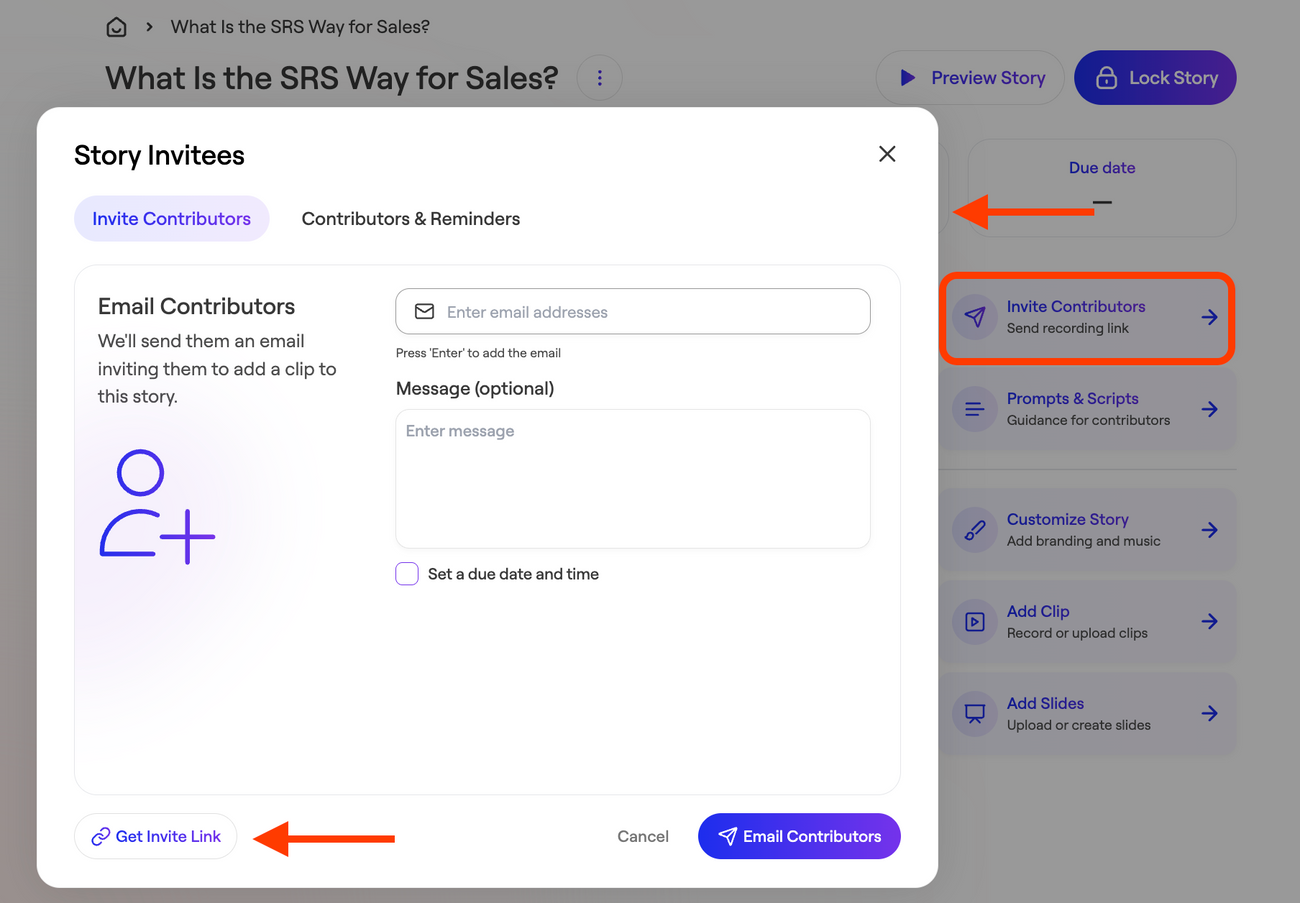
Contributors do not need to download an app or create a Spokn account to record.
Step 2: Personalize the Outreach
Participation increases significantly when outreach is direct, individualized, and complimentary.
Instead of:
Please record a video for this initiative.
Use:
Hi [Name], as we launch this campaign, I immediately thought of you. Your perspective would add meaningful value because of XYZ. Would you be willing to record a short 30-second response by Thursday?
Personalized outreach:
- Increases response rates
- Improves quality of submissions
- Builds internal buy-in
- Reduces follow-up reminders
Step 3: Explain Why It Matters
Help contributors understand:
- Where the video will be shared
- Who will see it
- Why their voice is important
Examples:
- This will be featured at our all-hands.
- Your clip will be included in onboarding.
- We’re sharing this across internal channels.
When contributors understand visibility and impact, they are more likely to participate.
Step 4: Keep the Ask Small
Always emphasize ease.
Reinforce that:
- It takes less than 30 seconds.
- They can record from their phone or laptop.
- No editing experience is required.
- A teleprompter is available if needed.
Reducing perceived effort removes friction.
Step 5: Set a Clear Deadline
Include a specific deadline with context.
Example:
Please submit your clip by Friday at 4 PM so we can finalize the video for Monday’s launch.
Deadlines increase completion rates.
If you’d like help drafting an outreach message for executives, ERGs, nonprofit partners, or large internal campaigns, contact the Spokn team for guidance.