

Auth0
Last updated July 21, 2026
- Create a new Application for Spokn.
- Enable SAML2 Web App Addon.
- In Settings, set “Application Callback URL” with the URL https://api.spokn.app/users/sso-web/callback
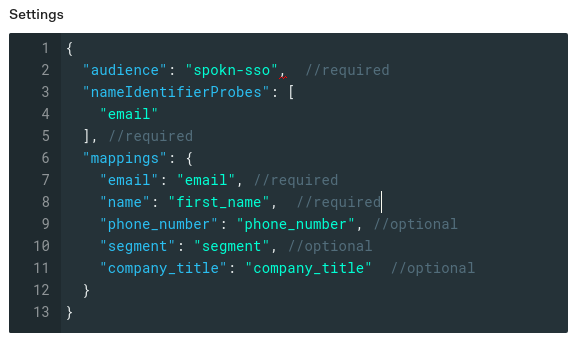
Add the mapping below:
Notes
- The “Audience” field is a string field that you must specify for it to be used in the company settings in your Spokn portal.
- You can add phone_number, segment, and company_title properties in the app metadata of each user where company_title means employee’s title in the company and segment means the name of the segment in the Spokn portal for each user.
Configuring Spokn (Final Step)
Please complete the following configuration to add SSO information to your company’s Spokn Account.
To update the portal with your SSO data:
- Visit the Spokn portal here: Setting SSO
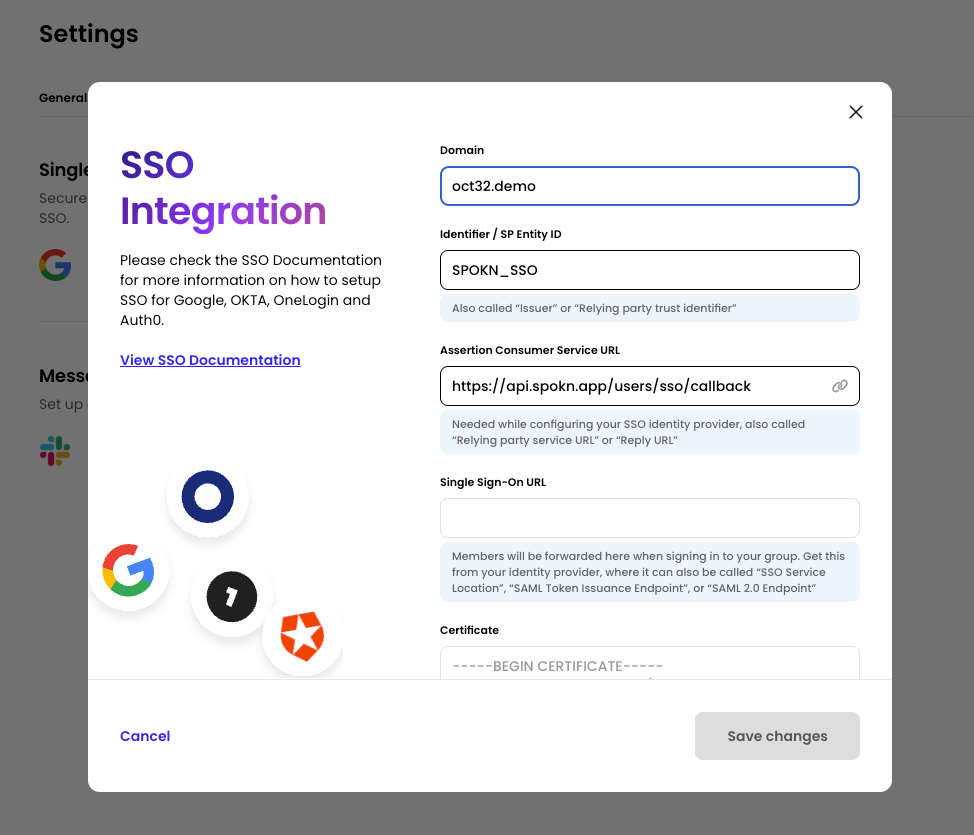
- In “Integration” Tab, Select “Connect” in the “Single Sign On” Section
- In the Domain field, set your domain (ex. getspokn.com)
- Copy the Identifier / SP Entity ID (SPOKN_SSO) to yours SSO SP identifier (Also called: Audience Restriction/sp Entity ID)
- Copy Assertion Consumer service URL ( https://api.spokn.app/users/sso-web/callback ) to your Reply URL (Also called: SAML Callback URL or relying party URL)
- In Single sign-on URL, paste your SSO Entry URL (Also called: SSO service location or SSO Endpoint)
In Certificate, add the certificate from your IdP (no need to remove the begin/end part, it will be truncated automatically)
Was this article helpful?